Monitoring Spring Boot 3.15 with Prometheus, Grafana, and Zipkin with docker compose
스프링 부트를 위해서 초간단 모니터링 시스템 구축하는 방법입니다
도커 컴포즈를 활용해서 빠르게 구축했습니다

이번 글을 통해 배워 갈 내용
- Prometheus 설명
- Grafana 설명
- Zipkin 설명
- 샘플 서비스 구조
- compose.yml
- prometheus.yml
- Post-Service 구조
- Comment-Service 구조
- 샘플 서비스 모니터링
Prometheus 설명
한 줄 요약
Prometheus는 메트릭 수집, 알림, 시각화, 서비스 디스커버리등을 제공하는 오픈소스 모니터링 툴
특징
시계열 데이터: 프로메테우스는 시계열로 데이터를 저장
자체 쿼리언어: PromQL이라는 자체 쿼리 언어 사용
데이터 수집 방법: HTTP를 통해 메트릭을 수집하며 push와 pull 방식지원
서비스디스커버리: 동적으로 서비스 디스커버리를 하며 클라우드 환경에서 자동으로 타깃을 찾고 모니터링도 가능
알림과 경고: 알림과 경고 시스템 제공
UI: 웹 UI와 DashBoard 제공
Grafana 설명
한 줄 요약
데이터 시각화와 모니터링 그리고 분석을 위한 오픈소스 플랫폼
특징
다양한 데이터소스 지원: Prometheus, InfluxDB, MySQL, PostgreSQL 등 다양한 데이터 소스와 호환
대시보드 기능: 사용자는 복잡한 쿼리를 통해 데이터를 시각화하고, 맞춤형 대시보드를 생성가능
경고 시스템: Grafana는 임계값을 기반으로 하는 경고 시스템을 제공
플러그인 확장성: 다양한 플러그인을 통해 기능을 확장가능
보안 기능: 사용자 관리, 데이터 소스에 대한 액세스 제어 등의 보안 기능을 제공
Zipkin 설명
한 줄 요약
분산추적 시스템으로 시스템 성능의 문제를 진단하고 해결하기 위해서 마이크로서비스에서 서비스 간에 연결을 추적하는 데 사용
특징
분산 추적: Zipkin은 분산된 서비스 환경에서 데이터 요청의 흐름을 추적하고 시각화해서 네트워크 지연, 병목 현상 및 오류를 식별가능
시각화 도구: 사용자 친화적인 대시보드를 통해 요청 흐름과 성능 메트릭스를 시각화
경량 프로토콜: Zipkin은 경량 데이터 전송 프로토콜을 사용하여 시스템에 부담을 최소화
다양한 언어 및 프레임워크 지원: Java, C#, JavaScript, Python 등 다양한 프로그래밍 언어와 프레임워크를 지원
확장성: 대규모 시스템에도 적용할 수 있도록 설계돼있으며 수집된 데이터를 다양한 저장소 옵션에 저장가능
샘플 서비스 구조
아래와 같이 서버들을 만들겠습니다
Post-Service localhost:8080
Comment-Service localhost:8082
Prometheus localhost:9090
Grafana localhost:3000
Zipkin localhost:9411
Post-Service에서는
GET /api/v1/posts
GET /api/v1/posts/{id}
를 통해
포스트 전체 리턴,
포스트상세(댓글리스트) 리턴
을 합니다
Comment-Service에서는
GET /api/v1/comments?postId={아이디}
를 통해
포스트아이디값으로 댓글 리스트를 리턴합니다
Post-Service는 댓글 리스트 값을 호출 시
Comment-Service를 Feign Client를 활용해서 호출합니다
Prometheus는 Post-Service, Comment-Service를 /actuator/prometheus 로 연결
grafana는 Prometheus로부터 Metrics를 연결
Zipkin Post-Service, Comment-Service에서 api/v2/spans 로 연결
되어 있습니다
compose.yml
도커 컴포즈를 사용해서 실행을 하였습니다
도커 컴포즈의 경우 아래 글을 참조해서 설치해 주시면 됩니다
https://codemasterkimc.tistory.com/689
우분투에 도커 컴포스 설치 하는 한가지 방법
``` One way to install Docker Compose on Ubuntu(22.04) ``` 이번 글을 통해 배워갈 내용 도커 컴포스 정의 도커 컴포스 설치 도커 컴포스 정의 한 줄 요약 여러 컨테이너들을 yml 파일로 한 번에 정의하고 실행
codemasterkimc.tistory.com
compose.yml 파일입니다
프로젝트 루트 혹은 원하는 위치에 배치하시면 됩니다
version: '3'
services:

  zipkin:
    container_name: zipkin-service
    image: openzipkin/zipkin:latest
    restart: always
    ports:
      - "9411:9411"

  prometheus:
    container_name: prometheus-service
    image: prom/prometheus
    restart: always
    extra_hosts:
      - host.docker.internal:host-gateway
    command:
      - --config.file=/etc/prometheus/prometheus.yml
    volumes:
      - ./prometheus.yml:/etc/prometheus/prometheus.yml
    ports:
      - "9090:9090"

  grafana:
    container_name: grafana-service
    image: grafana/grafana
    ports:
      - "3000:3000"

  post-service:
    container_name: spring-post-service
    image: post-service:0.0.1-SNAPSHOT
    ports:
      - "8080:5001"
    environment:
      - SPRING_PROFILES_ACTIVE=prod
      - ZIPKIN_TRACING_ENDPOINT=http://zipkin:9411/api/v2/spans

  comment-service:
    container_name: spring-comment-service
    image: comment-service:0.0.1-SNAPSHOT
    ports:
      - "8082:5002"
    environment:
      - SPRING_PROFILES_ACTIVE=prod
      - ZIPKIN_TRACING_ENDPOINT=http://zipkin:9411/api/v2/spans
prometheus.yml
볼륨 설정으로 인해서
compose.yml과 같은 위치에 배치하시면 됩니다
global:
  scrape_interval: 10s
  evaluation_interval: 10s

scrape_configs:
  - job_name: "spring-post-service"
    metrics_path: /actuator/prometheus
    static_configs:
      - targets: ['host.docker.internal:8080']

  - job_name: "spring-comment-service"
    metrics_path: /actuator/prometheus
    static_configs:
      - targets: [ 'host.docker.internal:8082' ]
Post-Service 구조
수정된 파일들은 아래와 같습니다
pom.xml
Comment.java
CommentFeignClient.java
Post.java
PostController.java
PostService.java
application.yml
application-prod.yml
pom.xml
<?xml version="1.0" encoding="UTF-8"?>
<project xmlns="http://maven.apache.org/POM/4.0.0" xmlns:xsi="http://www.w3.org/2001/XMLSchema-instance"
         xsi:schemaLocation="http://maven.apache.org/POM/4.0.0 https://maven.apache.org/xsd/maven-4.0.0.xsd">
    <modelVersion>4.0.0</modelVersion>
    <parent>
        <groupId>org.springframework.boot</groupId>
        <artifactId>spring-boot-starter-parent</artifactId>
        <version>3.1.5</version>
        <relativePath/> <!-- lookup parent from repository -->
    </parent>
    <groupId>com.example</groupId>
    <artifactId>post-service</artifactId>
    <version>0.0.1-SNAPSHOT</version>
    <name>post-service</name>
    <description>post-service</description>
    <properties>
        <java.version>21</java.version>
    </properties>
    <dependencies>
        <dependency>
            <groupId>org.springframework.boot</groupId>
            <artifactId>spring-boot-starter-actuator</artifactId>
        </dependency>
        <dependency>
            <groupId>org.springframework.boot</groupId>
            <artifactId>spring-boot-starter-web</artifactId>
        </dependency>
        <dependency>
            <groupId>io.micrometer</groupId>
            <artifactId>micrometer-tracing-bridge-brave</artifactId>
        </dependency>
        <dependency>
            <groupId>io.zipkin.reporter2</groupId>
            <artifactId>zipkin-reporter-brave</artifactId>
        </dependency>
        <dependency>
            <groupId>org.springframework.cloud</groupId>
            <artifactId>spring-cloud-starter-openfeign</artifactId>
            <version>4.0.4</version>
        </dependency>
        <dependency>
            <groupId>io.micrometer</groupId>
            <artifactId>micrometer-registry-prometheus</artifactId>
            <scope>runtime</scope>
        </dependency>
        <dependency>
            <groupId>org.projectlombok</groupId>
            <artifactId>lombok</artifactId>
            <optional>true</optional>
        </dependency>
        <dependency>
            <groupId>org.springframework.boot</groupId>
            <artifactId>spring-boot-starter-test</artifactId>
            <scope>test</scope>
        </dependency>
    </dependencies>

    <build>
        <plugins>
            <plugin>
                <groupId>org.springframework.boot</groupId>
                <artifactId>spring-boot-maven-plugin</artifactId>
                <configuration>
                    <image>
                        <builder>paketobuildpacks/builder-jammy-base:latest</builder>
                    </image>
                    <excludes>
                        <exclude>
                            <groupId>org.projectlombok</groupId>
                            <artifactId>lombok</artifactId>
                        </exclude>
                    </excludes>
                </configuration>
            </plugin>
        </plugins>
    </build>

</project>
Comment.java
package com.example.postservice;

import java.io.Serial;
import java.io.Serializable;

public class Comment implements Serializable {
    @Serial
    private static final long serialVersionUID = 1L;

    private int id;
    private String text;
    private int postId;

    public Comment(int id, String text, int postId) {
        this.id = id;
        this.text = text;
        this.postId = postId;
    }

    public int getId() {
        return id;
    }

    public void setId(int id) {
        this.id = id;
    }

    public String getText() {
        return text;
    }

    public void setText(String text) {
        this.text = text;
    }

    public int getPostId() {
        return postId;
    }

    public void setPostId(int postId) {
        this.postId = postId;
    }

    @Override
    public String toString() {
        return "Comment{" +
                "id=" + id +
                ", text='" + text + '\'' +
                ", postId=" + postId +
                '}';
    }
}
CommentFeignClient.java
package com.example.postservice;

import org.springframework.cloud.openfeign.FeignClient;
import org.springframework.web.bind.annotation.GetMapping;
import org.springframework.web.bind.annotation.RequestParam;

import java.util.List;

@FeignClient(value = "comment-service", url = "http://host.docker.internal:8082/api/v1/comments")
public interface CommentFeignClient {

    @GetMapping("")
    List<Comment> findCommentsByPostId(@RequestParam int postId);

}
Post.java
package com.example.postservice;

import java.io.Serial;
import java.io.Serializable;
import java.util.List;

public class Post implements Serializable {
    @Serial
    private static final long serialVersionUID = 2L;

    private int id;
    private String title;
    private String body;
    private List<Comment> comments;

    public Post(int id, String title, String body, List<Comment> comments) {
        this.id = id;
        this.title = title;
        this.body = body;
        this.comments = comments;
    }

    public int getId() {
        return id;
    }

    public void setId(int id) {
        this.id = id;
    }

    public String getTitle() {
        return title;
    }

    public void setTitle(String title) {
        this.title = title;
    }

    public String getBody() {
        return body;
    }

    public void setBody(String body) {
        this.body = body;
    }

    public List<Comment> getComments() {
        return comments;
    }

    public void setComments(List<Comment> comments) {
        this.comments = comments;
    }

    @Override
    public String toString() {
        return "Post{" +
                "id=" + id +
                ", title='" + title + '\'' +
                ", body='" + body + '\'' +
                ", comments=" + comments +
                '}';
    }
}
PostController.java
package com.example.postservice;

import org.springframework.web.bind.annotation.GetMapping;
import org.springframework.web.bind.annotation.PathVariable;
import org.springframework.web.bind.annotation.RequestMapping;
import org.springframework.web.bind.annotation.RestController;

import java.util.List;

@RestController
@RequestMapping("/api/v1/posts")
public class PostController {

    private final PostService postService;

    public PostController(PostService postService) {
        this.postService = postService;
    }

    @GetMapping("")
    public List<Post> findAllPosts() throws InterruptedException {
        return postService.findAllPost();
    }

    @GetMapping(path = "/{id}")
    public Post findPostByIdWithComments(@PathVariable int id) throws InterruptedException {
        return postService.findPostByIdWithComments(id);
    }

}
PostService.java
package com.example.postservice;

import io.micrometer.tracing.annotation.NewSpan;
import lombok.extern.slf4j.Slf4j;
import org.springframework.stereotype.Service;

import java.util.List;

@Service
@Slf4j
public class PostService {

    private final CommentFeignClient commentFeignClient;

    public PostService(CommentFeignClient commentFeignClient) {
        this.commentFeignClient = commentFeignClient;
    }

    @NewSpan(value = "post-service-findAllPost-method-span")
    public List<Post> findAllPost() throws InterruptedException {
        Thread.sleep(500);
        //log.info("find all posts...");
        return List.of( new Post(1, "SampleTitle", "SampleBody", null));
    }

    @NewSpan(value = "post-service-getPostWithComments-span")
    public Post findPostByIdWithComments(int id) {
        List<Comment> comments = commentFeignClient.findCommentsByPostId(id);
        return new Post(id, "SampleTitle", "SampleBody", comments);
    }
}
application.yml
spring:
  profiles:
    active: ${SPRING_PROFILES_ACTIVE}
application-prod.yml
server:
  port: 5001

spring:
  application:
    name: spring-post-service

management:
  zipkin:
    tracing:
      endpoint: ${ZIPKIN_TRACING_ENDPOINT}
  tracing:
    sampling:
      probability: 1.0
  endpoints:
    web:
      exposure:
        include: health, prometheus, metrics
  metrics:
    tags:
      application: ${spring.application.name}

logging:
  pattern:
    level: "%5p [${spring.application.name:},%X{traceId:-},%X{spanId:-}]"
Comment-Service 구조
수정된 파일들은 아래와 같습니다
pom.xml
<?xml version="1.0" encoding="UTF-8"?>
<project xmlns="http://maven.apache.org/POM/4.0.0" xmlns:xsi="http://www.w3.org/2001/XMLSchema-instance"
         xsi:schemaLocation="http://maven.apache.org/POM/4.0.0 https://maven.apache.org/xsd/maven-4.0.0.xsd">
    <modelVersion>4.0.0</modelVersion>
    <parent>
        <groupId>org.springframework.boot</groupId>
        <artifactId>spring-boot-starter-parent</artifactId>
        <version>3.1.5</version>
        <relativePath/> <!-- lookup parent from repository -->
    </parent>
    <groupId>com.example</groupId>
    <artifactId>comment-service</artifactId>
    <version>0.0.1-SNAPSHOT</version>
    <name>comment-service</name>
    <description>comment-service</description>
    <properties>
        <java.version>21</java.version>
    </properties>
    <dependencies>
        <dependency>
            <groupId>org.springframework.boot</groupId>
            <artifactId>spring-boot-starter-actuator</artifactId>
        </dependency>
        <dependency>
            <groupId>org.springframework.boot</groupId>
            <artifactId>spring-boot-starter-web</artifactId>
        </dependency>
        <dependency>
            <groupId>io.micrometer</groupId>
            <artifactId>micrometer-tracing-bridge-brave</artifactId>
        </dependency>
        <dependency>
            <groupId>io.zipkin.reporter2</groupId>
            <artifactId>zipkin-reporter-brave</artifactId>
        </dependency>

        <dependency>
            <groupId>io.micrometer</groupId>
            <artifactId>micrometer-registry-prometheus</artifactId>
            <scope>runtime</scope>
        </dependency>
        <dependency>
            <groupId>org.projectlombok</groupId>
            <artifactId>lombok</artifactId>
            <optional>true</optional>
        </dependency>
        <dependency>
            <groupId>org.springframework.boot</groupId>
            <artifactId>spring-boot-starter-test</artifactId>
            <scope>test</scope>
        </dependency>
    </dependencies>

    <build>
        <plugins>
            <plugin>
                <groupId>org.springframework.boot</groupId>
                <artifactId>spring-boot-maven-plugin</artifactId>
                <configuration>
                    <image>
                        <builder>paketobuildpacks/builder-jammy-base:latest</builder>
                    </image>
                    <excludes>
                        <exclude>
                            <groupId>org.projectlombok</groupId>
                            <artifactId>lombok</artifactId>
                        </exclude>
                    </excludes>
                </configuration>
            </plugin>
        </plugins>
    </build>

</project>
Comment.java
package com.example.demo;

import java.io.Serializable;
import java.io.Serial;

public class Comment implements Serializable {
    @Serial
    private static final long serialVersionUID = 1L;

    private int id;
    private String text;
    private int postId;

    public Comment(int id, String text, int postId) {
        this.id = id;
        this.text = text;
        this.postId = postId;
    }

    public int getId() {
        return id;
    }

    public void setId(int id) {
        this.id = id;
    }

    public String getText() {
        return text;
    }

    public void setText(String text) {
        this.text = text;
    }

    public int getPostId() {
        return postId;
    }

    public void setPostId(int postId) {
        this.postId = postId;
    }

    @Override
    public String toString() {
        return "Comment{" +
                "id=" + id +
                ", text='" + text + '\'' +
                ", postId=" + postId +
                '}';
    }
}
CommentController.java
package com.example.demo;

import org.springframework.beans.factory.annotation.Autowired;
import org.springframework.web.bind.annotation.GetMapping;
import org.springframework.web.bind.annotation.RequestMapping;
import org.springframework.web.bind.annotation.RequestParam;
import org.springframework.web.bind.annotation.RestController;

import java.util.List;

@RestController
@RequestMapping("/api/v1/comments")
public class CommentController {

    private final CommentService commentService;

    public CommentController(CommentService commentService) {
        this.commentService = commentService;
    }

    @GetMapping("")
    public List<Comment> findCommentsByPostId(@RequestParam int postId) {
        return commentService.findCommentsByPostId(postId);
    }

}CommentService.java
package com.example.demo;

import io.micrometer.tracing.annotation.NewSpan;
import lombok.extern.slf4j.Slf4j;
import org.springframework.stereotype.Service;

import java.util.List;

@Service
@Slf4j
public class CommentService {

    private List<Comment> comments = List.of(
            new Comment(1, "포스트 1", 1),
            new Comment(2, "포스트 2", 1),
            new Comment(3, "포스트 3", 2),
            new Comment(4, "포스트 4", 2),
            new Comment(5, "포스트 5", 3)
    );

    @NewSpan(value = "comment-service-findCommentsByPostId-span")
    public List<Comment> findCommentsByPostId(int postId) {
        return comments.stream().filter(comment -> comment.getPostId() == postId).toList();
    }

}
application.yml
spring:
  profiles:
    active: ${SPRING_PROFILES_ACTIVE}
application-prod.yml
server:
  port: 5002

spring:
  application:
    name: spring-comment-service

management:
  zipkin:
    tracing:
      endpoint: ${ZIPKIN_TRACING_ENDPOINT}
  tracing:
    sampling:
      probability: 1.0
  endpoints:
    web:
      exposure:
        include: health, prometheus, metrics
  metrics:
    tags:
      application: ${spring.application.name}
logging:
  pattern:
    level: "%5p [${spring.application.name:},%X{traceId:-},%X{spanId:-}]"
샘플 서비스 모니터링
스프링 이미지들을 정상적으로 빌드하고
mvn spring-boot:build-image
도커 컴포즈 세팅을 실행합니다
docker compose up -d

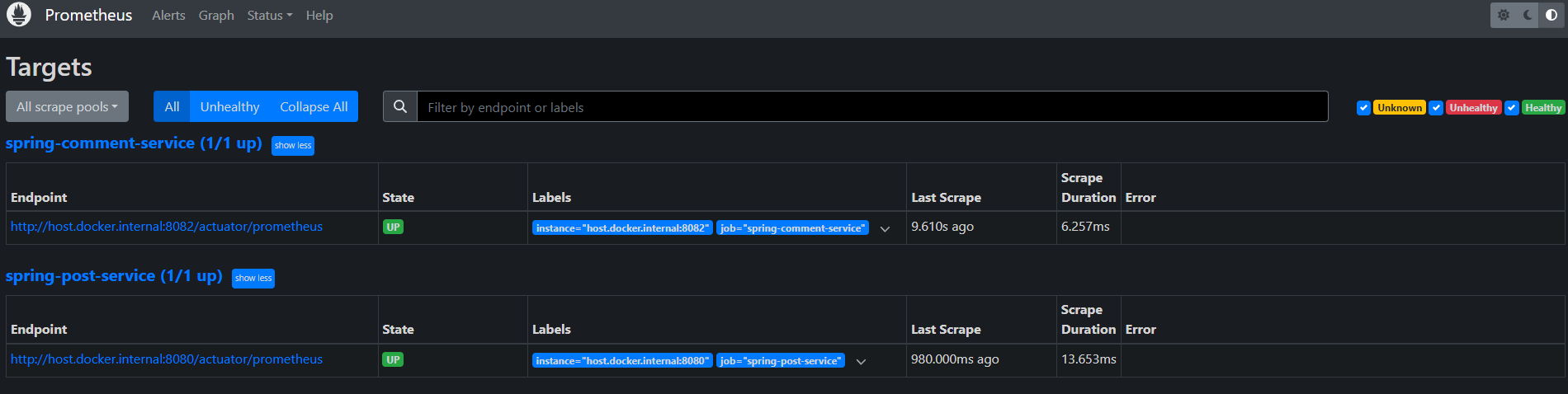
먼저 프로메테우스를 확인합니다
http://127.0.0.1:9090/targets
post-service와
comment-service 모두 State가 Up 인 것을 확인 가능합니다
http://127.0.0.1:9090/graph

API 호출과 횟수를 확인하였습니다
그다음 그라파나를 확인합니다
http://127.0.0.1:3000/login
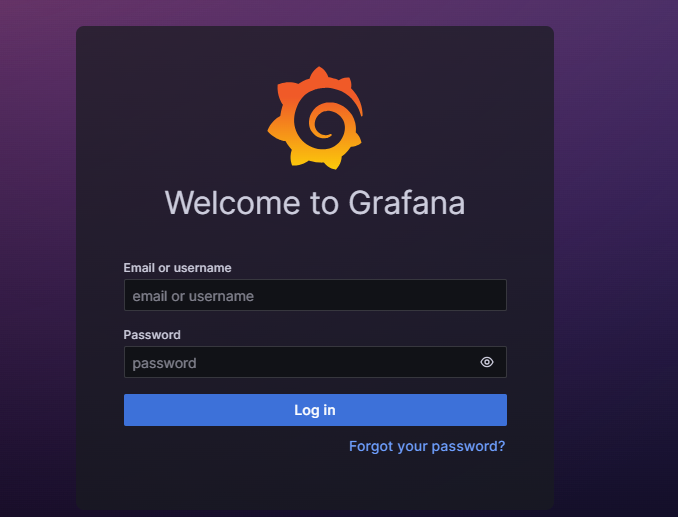
admin
admin
을 입력해서 로그인 한 다음
비밀번호를 변경하거나 skip을 합니다
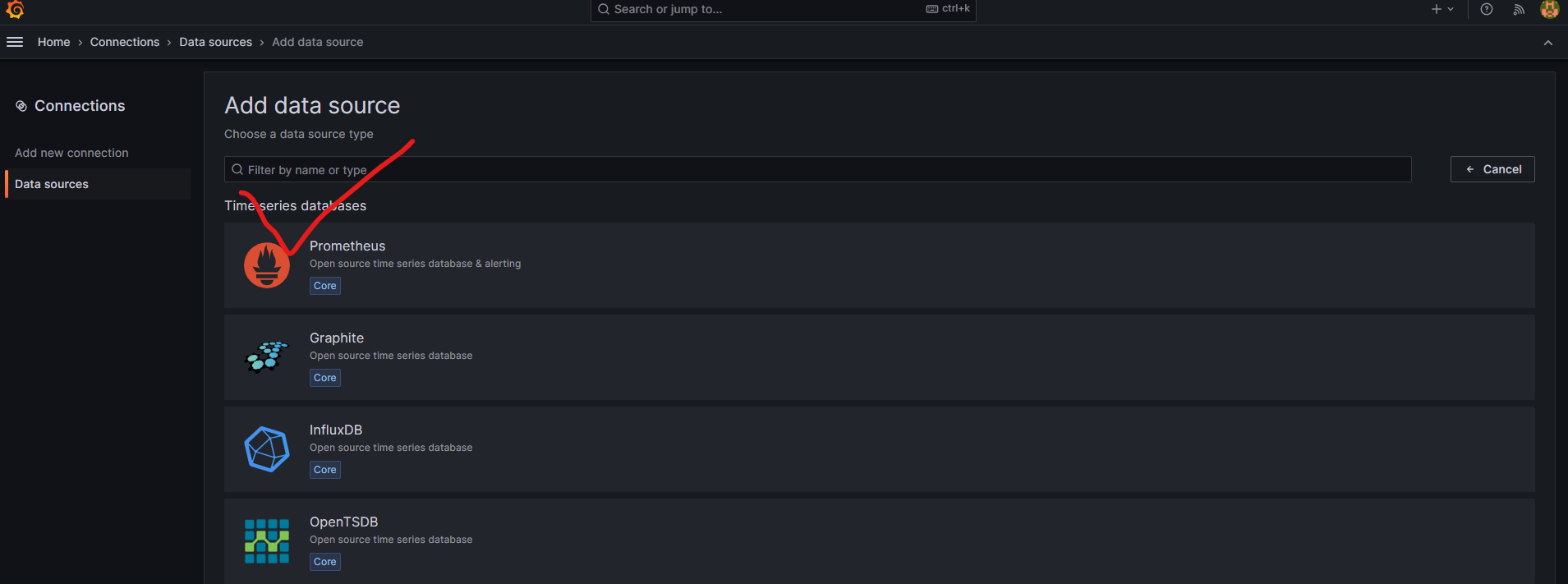
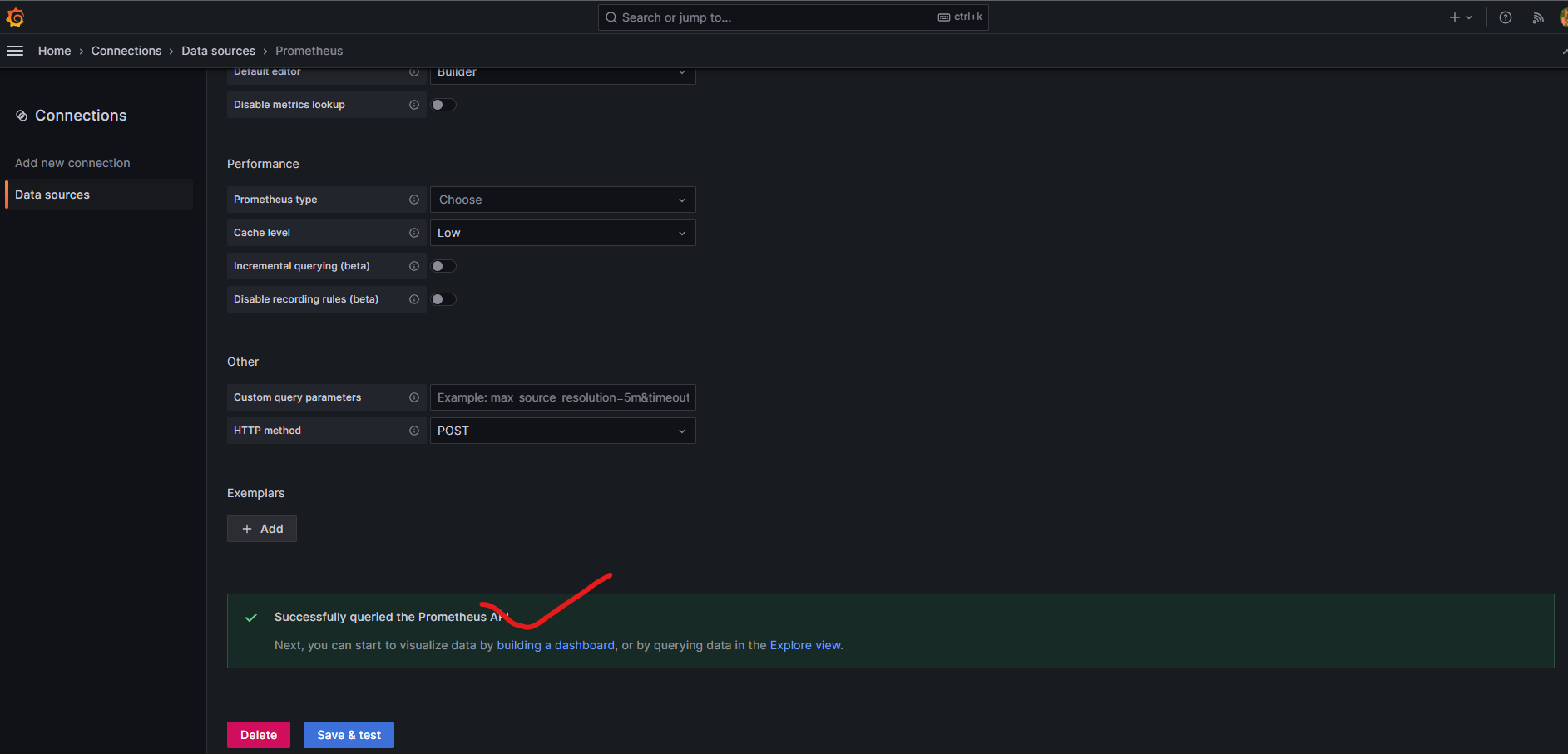
데이터 소스 추가

프로메테우스 선택
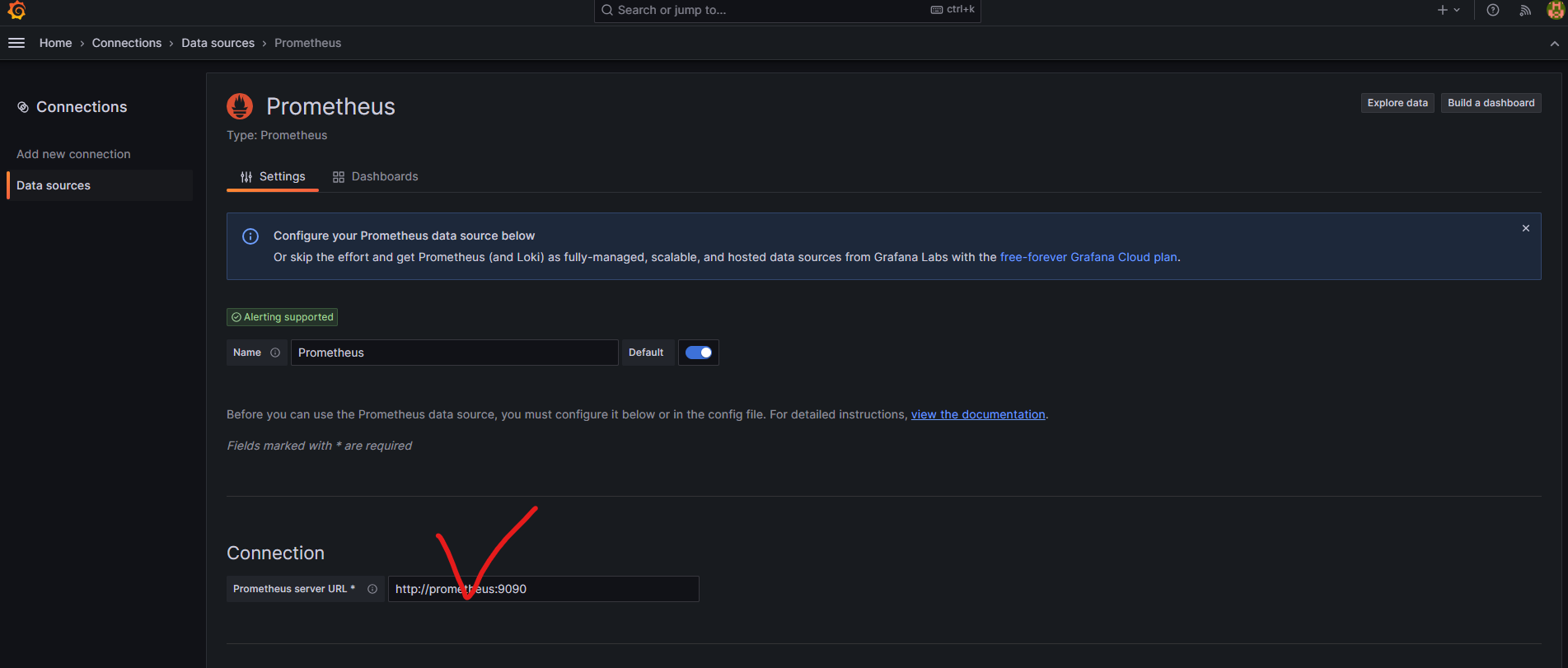
컨테이너에서 접속하는 프로메테우스 주소 입력
저장
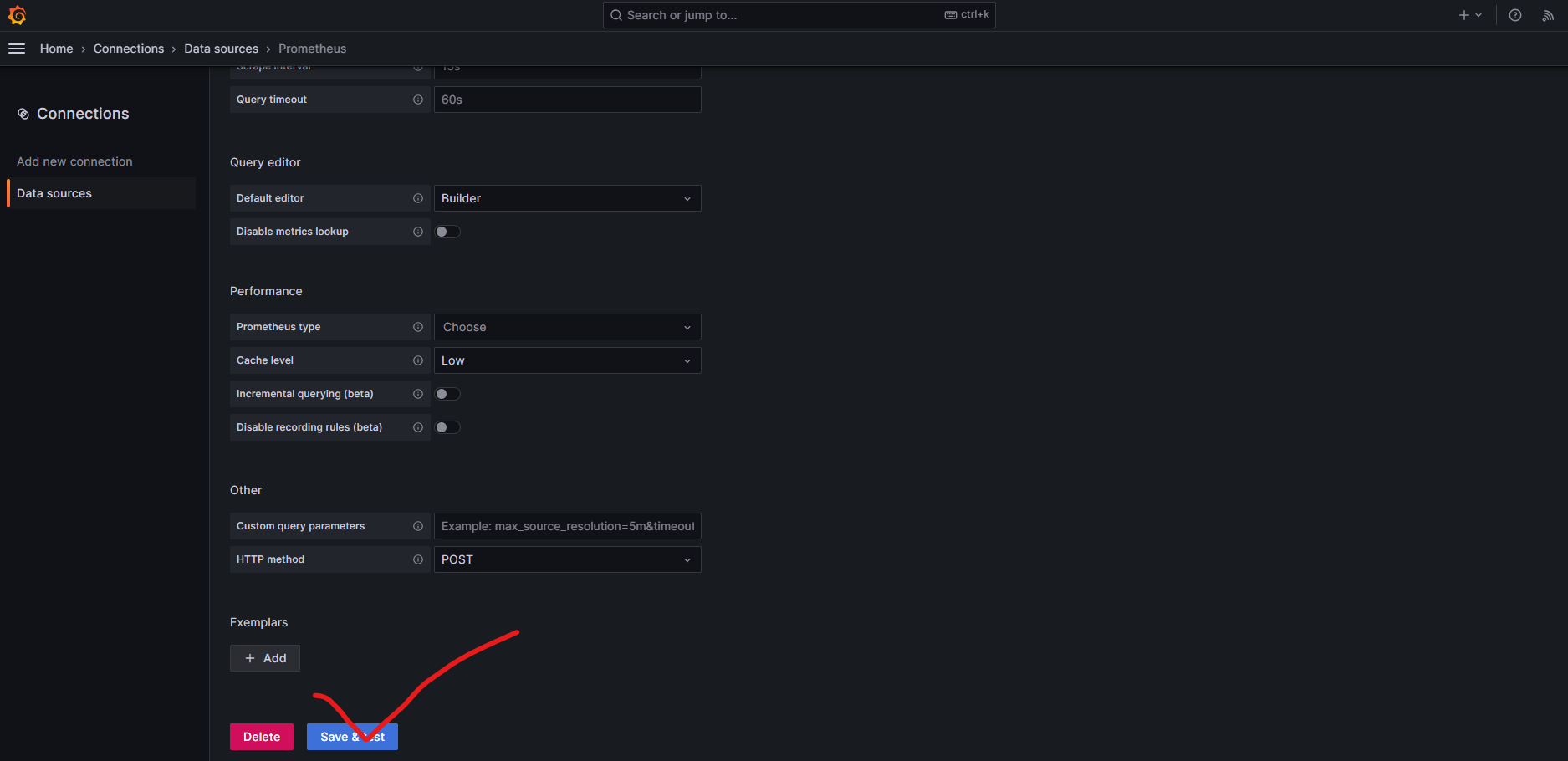
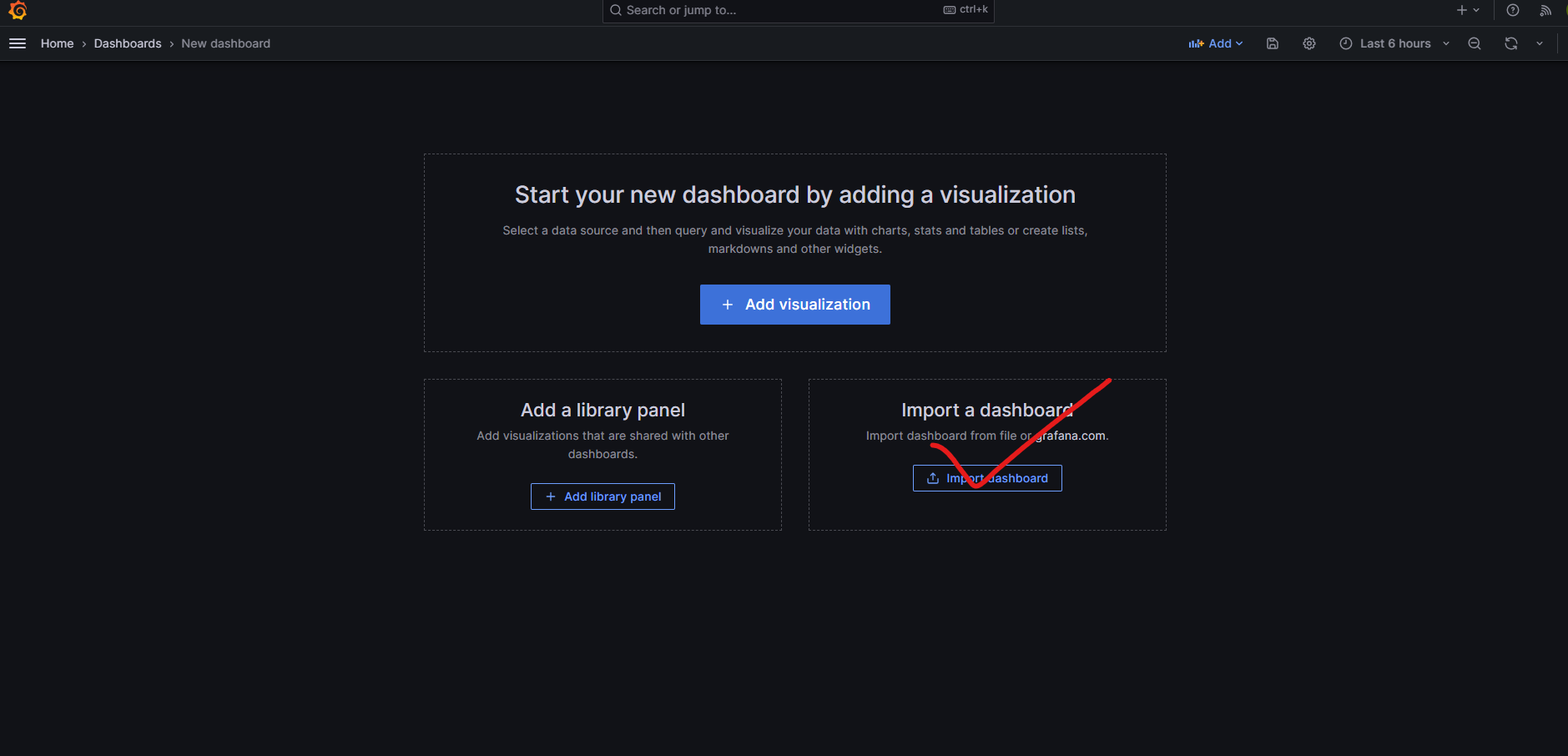
대시보드 생성
대시보드 세팅 불러오기
인터넷에 있는 19004 대시보드 세팅 불러오기
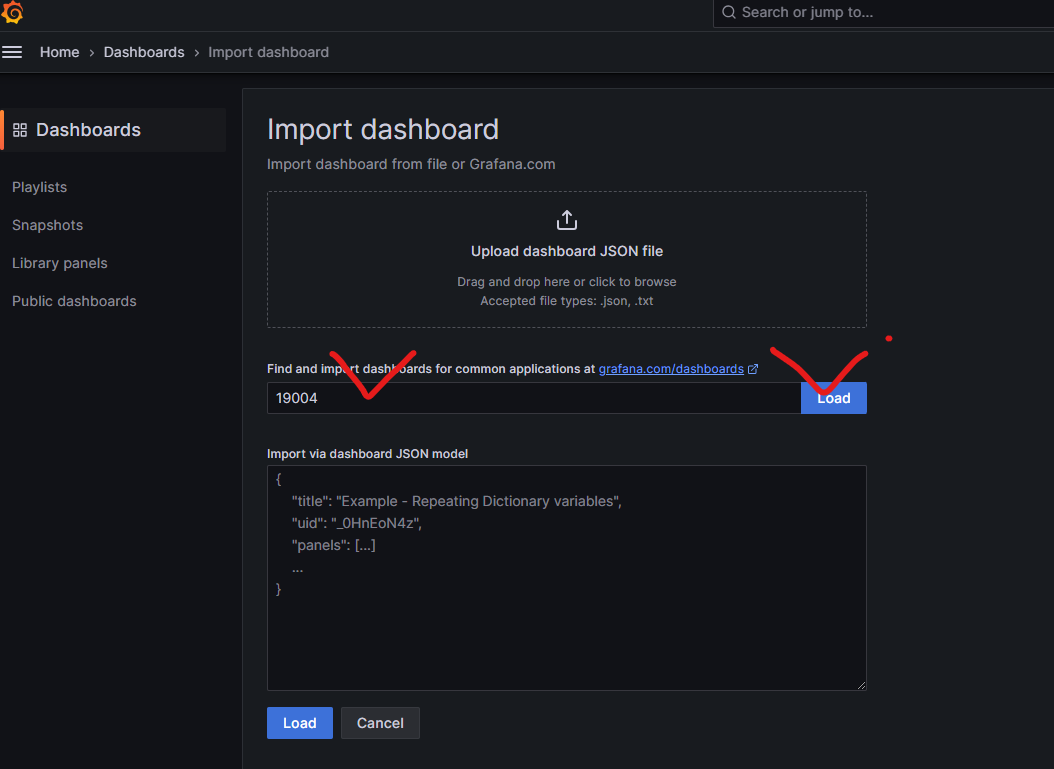
import 버튼을 눌러서 import
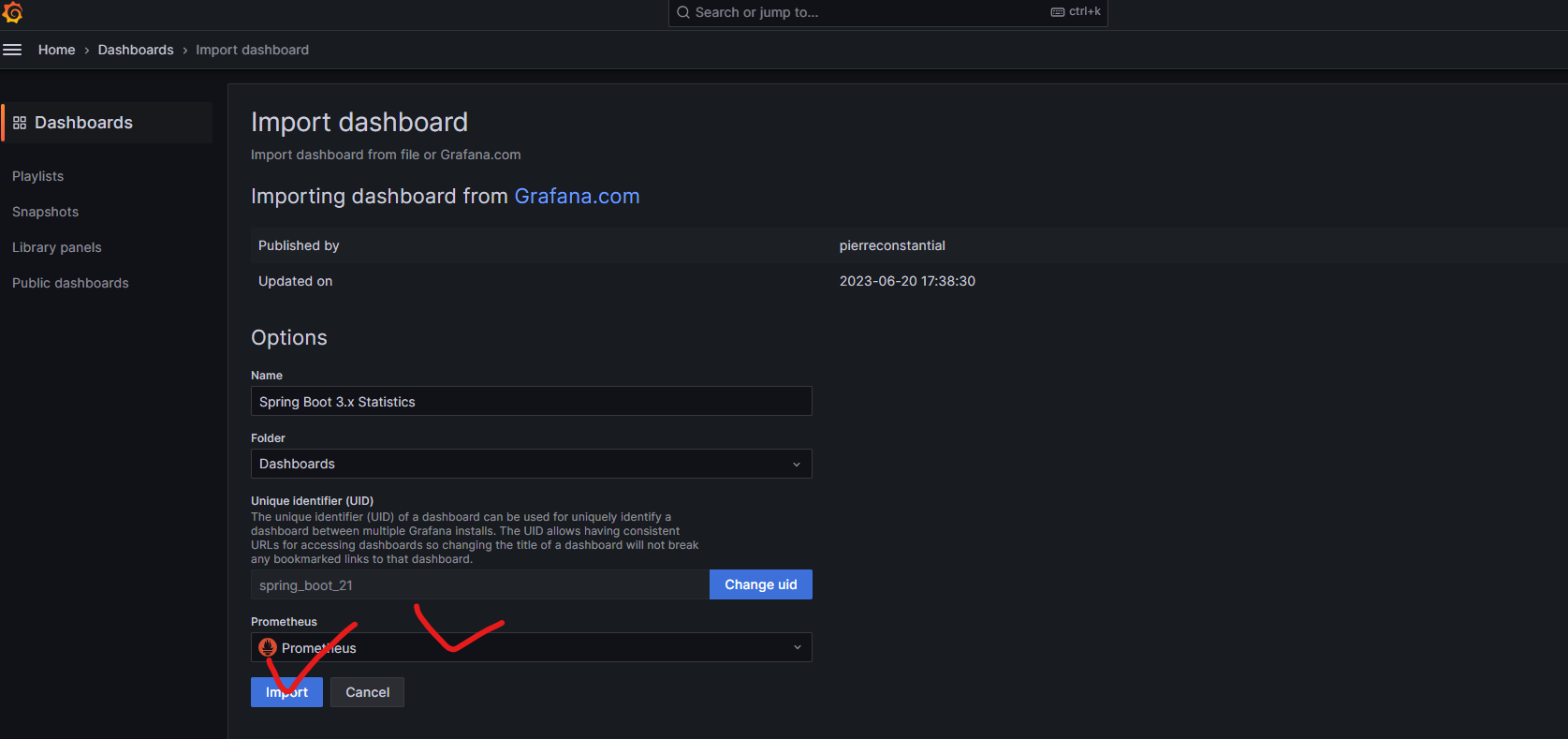
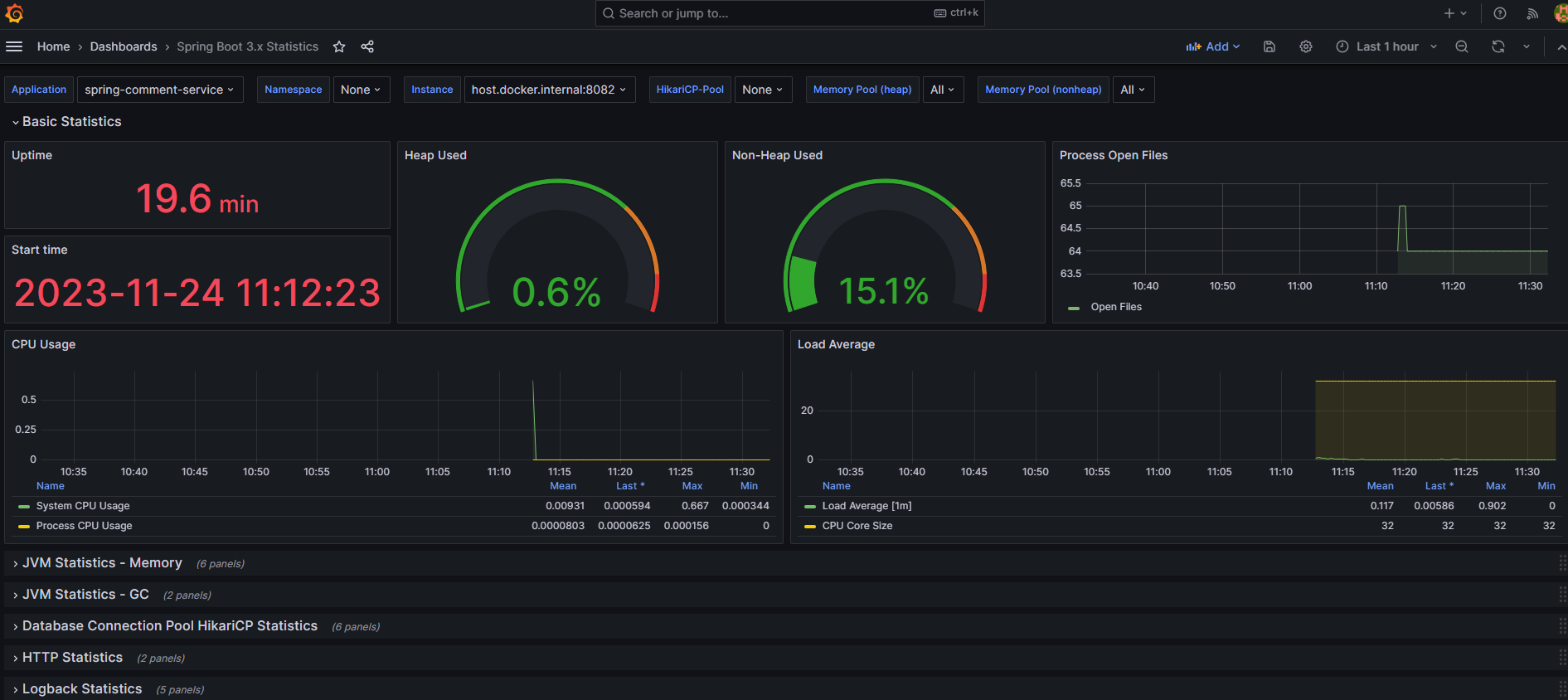
그라파나 설정 확인
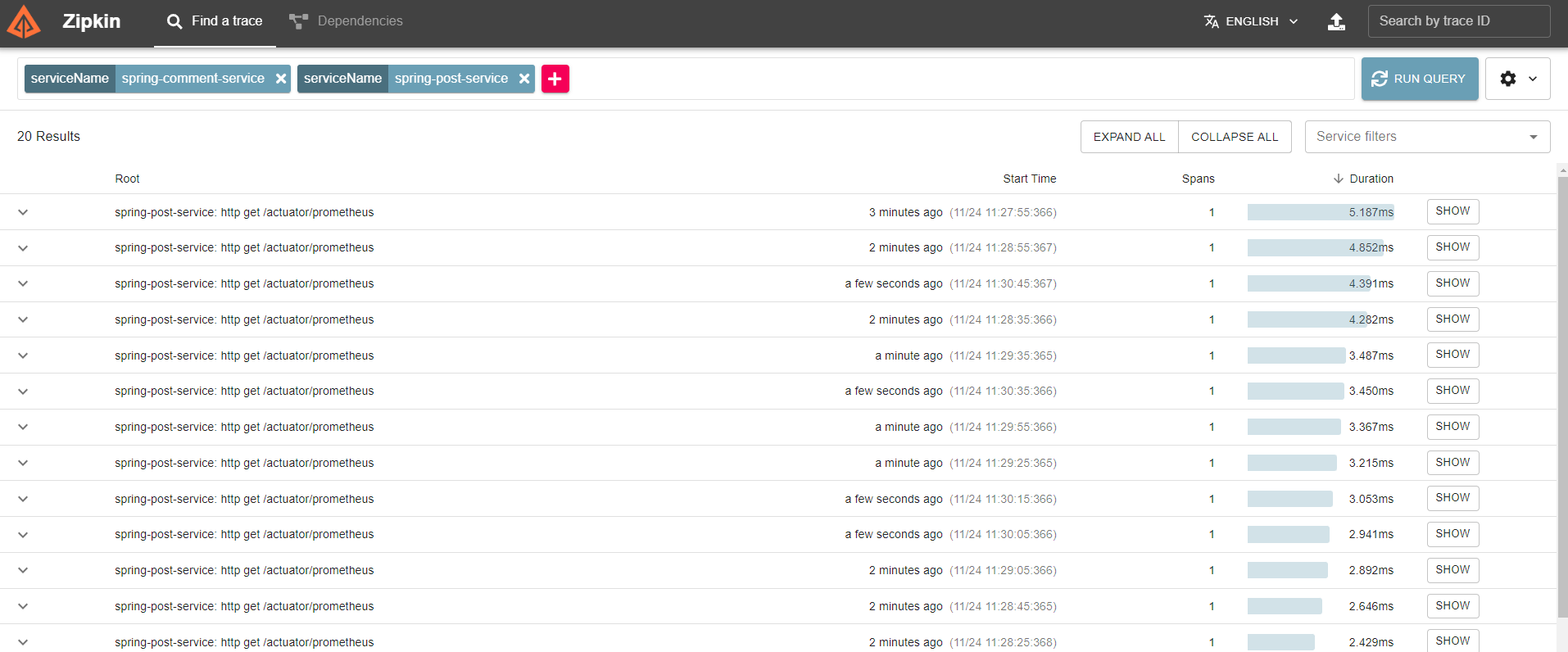
집킨도 확인해 줍니다
http://localhost:9411
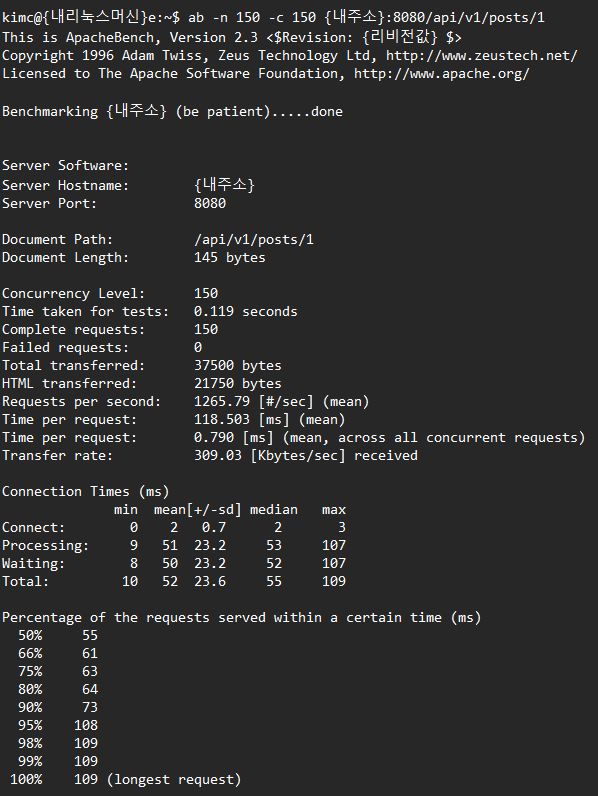
이제 커맨드 창에서 API를 호출해서 여러 가지 테스트를 해봅니다
ab -n 150 -c 150 주소/api/v1/posts/1
예) ab -n 150 -c 192.168.0.254:8080/api/v1/posts/1
API 호출한 값들을
Grafana, Zipkin을 통해 확인합니다
참조 및 인용
https://grafana.com/docs/grafana/latest/setup-grafana/installation/docker/
Run Grafana Docker image | Grafana documentation
Enterprise Open source Run Grafana Docker image You can use Grafana Cloud to avoid installing, maintaining, and scaling your own instance of Grafana. Create a free account to get started, which includes free forever access to 10k metrics, 50GB logs, 50GB t
grafana.com
Documentation | Grafana Labs
Thank you! Your message has been received!
grafana.com
https://zipkin.io/pages/quickstart.html
Quickstart · OpenZipkin
Quickstart In this section we’ll walk through building and starting an instance of Zipkin for checking out Zipkin locally. There are three options: using Java, Docker or running from source. If you are familiar with Docker, this is the preferred method t
zipkin.io
Prometheus - Monitoring system & time series database
An open-source monitoring system with a dimensional data model, flexible query language, efficient time series database and modern alerting approach.
prometheus.io
https://roqkfwkdldirl.tistory.com/91
52. docker container 만들기(zipkin, prometheus, grafana)
1. https://zipkin.io/pages/quickstart Quickstart · OpenZipkin Quickstart In this section we’ll walk through building and starting an instance of Zipkin for checking out Zipkin locally. There are three options: using Java, Docker or running from source.
roqkfwkdldirl.tistory.com
https://github.com/karluqs/elk-prometheus-grafana-zipkin-graylog-stack
GitHub - karluqs/elk-prometheus-grafana-zipkin-graylog-stack: ELK + Prometheus + Grafana communication POC
ELK + Prometheus + Grafana communication POC. Contribute to karluqs/elk-prometheus-grafana-zipkin-graylog-stack development by creating an account on GitHub.
github.com
https://grafana.com/grafana/dashboards/19004-spring-boot-statistics/
Spring Boot 3.x Statistics | Grafana Labs
Thank you! Your message has been received!
grafana.com
블로그 추천 포스트
https://codemasterkimc.tistory.com/50
300년차 개발자의 좋은 코드 5계명 (Clean Code)
이번 글을 통해 배워갈 내용 좋은 코드(Clean Code)를 작성하기 위해 개발자로서 생각해볼 5가지 요소를 알아보겠습니다. 개요 좋은 코드란 무엇일까요? 저는 자원이 한정적인 컴퓨터 세상에서 좋
codemasterkimc.tistory.com
오늘도 즐거운 코딩 하시길 바랍니다 ~ :)
'Spring' 카테고리의 다른 글
| 도커 컴포스활용 간단한 FTP 서버 설정과 파일 업로드/다운로드 기능을 갖는 스프링 부트 애플리케이션 만들기 (0) | 2024.01.20 |
|---|---|
| 도커 네트워크에서 프로메테우스, 스프링 부트 및 스프링 시큐리티 마스터하기: 종합 가이드 (0) | 2024.01.10 |
| https를 사용하지 않는 Spring OAuth 리디렉션_uri 해결방법 (0) | 2023.09.14 |
| Spring JPA entity in Kotlin Class (0) | 2023.08.21 |
| Spring Social Login Spring Boot 3.1.1 버전으로 업하면서 생긴 버그 픽스 (0) | 2023.07.18 |