[Node.js] CI/CD 구축 - Github Actions, Ubuntu 22, vultr

간단 설명
NodeJs 자동배포 CI CD 구축을 만들어보겠습니다
기술의 경우 리눅스 기반 시스템(Ubuntu), Nodejs 서버, Github Actions 등이 사용되었습니다
Jenkins, Travis CI 그리고 CircleCI 등도 많이 씁니다만
요즘에는 무료와 가성비에 관심이 많아서 Github Actions를 사용합니다
CI CD는
Continuous Integration
Continuous Deployment
로서 지속적 통합 지속적 배포입니다
Github Actions는 Github에서 제공하는 자동화 플랫폼입니다
먼저 Ubuntu 에 접속합니다
그다음
Secure Shell Protocol SSH 키를 생성해 줍니다
rsa 방식도 있고 ed25519 방식도 있습니다
저는 ed25519 방식을 사용합니다
ssh-keygen -t rsa -b 4096 -C "kimc_sample_email@example.com"ssh-keygen -t ed25519 -C "kimc_sample_email@example.com"또한 Passphrase(비밀번호)를 사용하시기를 권장합니다
키를 생성하고 나서
SSH키를 백그라운드에서 사용하기 위해서 아래와 같이 입력해 줍니다
eval "$(ssh-agent -s)"
ssh-add ~/.ssh/id_ed25519
public 키를 확인하고 복사한 다음
cat ~/.ssh/id_ed25519.pub아래와 같은 파일에 public 키를 붙여 넣기 해줍니다
vi ~/.ssh/authorized_keys
깃허브에 추가해 줍니다
settings -> SSH and GCP keys -> New SSH key에 동일하게 복붙 해줍니다
그다음 우분투에서 깃으로 연결확인을 해봅니다
ssh -T git@github.com
Node 프로젝트 Repository로 이동합니다
.github/workflows/cicd.yml 파일을 만들고
아래와 같이 추가해 줍니다
name: Node.js CI

on:
  push:
    branches: [ "main" ]
  pull_request:
    branches: [ "main" ]

jobs:
  build:

    runs-on: ubuntu-latest

    strategy:
      matrix:
        node-version: [18.x]
        # See supported Node.js release schedule at https://nodejs.org/en/about/releases/

    steps:
    - uses: actions/checkout@v3
    - name: Use Node.js ${{ matrix.node-version }}
      uses: actions/setup-node@v3
      with:
        node-version: ${{ matrix.node-version }}
        cache: 'npm'
    - run: npm install
    - run: npm run build --if-present

  deploy:
    needs: [build]
    runs-on: ubuntu-latest

# HOST는 우분투 주소 입니다
# USERNAME은 우분투의 유저 이름입니다
# KEY는 PRIVATE 키값입니다
# PASSPHRASE는 비밀번호입니다
    steps:
    - name: Deploy using ssh
      uses: appleboy/ssh-action@master
      with:
        host: ${{ secrets.HOST }}
        username: ${{ secrets.USERNAME }}
        key: ${{ secrets.PRIVATE_KEY }}
        passphrase: ${{ secrets.PASSPHRASE }}
        port: 22
        script: |
          cd 설치된 경로 # 우분투에 설치하실 경로를 넣어주세요
          sudo git pull
          sudo git status
          sudo npm run build
          sudo npm run start
필요시 node 설치 및 pm2 설치
node -v
curl -sL https://deb.nodesource.com/setup_18.x | sudo -E bash -
sudo apt-get install -y nodejs
npm install pm2 -g
node 프로젝트
package.json의 경우 start 파일은 reload로 설정하고
"start": "pm2 reload ./dist/index.js
초기 배포하기 전에
npm install
npm build
pm2 start를 해주면 좋습니다
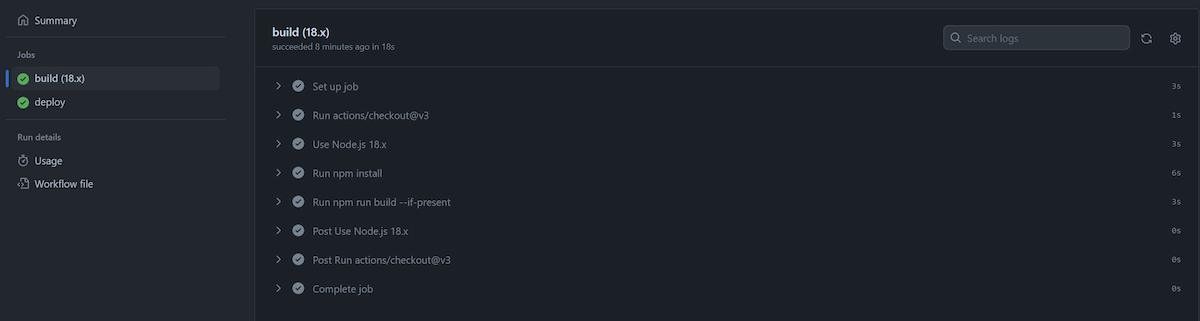
[Node.js] CI/CD - Github Actions, Ubuntu 22, vultr success image
참조
reference
https://docs.github.com/en/authentication/connecting-to-github-with-ssh/generating-a-new-ssh-key-and-adding-it-to-the-ssh-agent#generating-a-new-ssh-key
https://docs.github.com/en/authentication/connecting-to-github-with-ssh/adding-a-new-ssh-key-to-your-github-account