리눅스 우분투에 고정 아이피 설정하는 두가지 방법(netplan)

우분투에서 고정아이피 설정하는 법에 대해서 알아보겠습니다.
먼저 VM에서 작업하는 경우
하단에 네트워크 설정을 연 다음 어댑터에 브리지로 설정해줍니다.
(WIFI는 추천하지 않습니다)
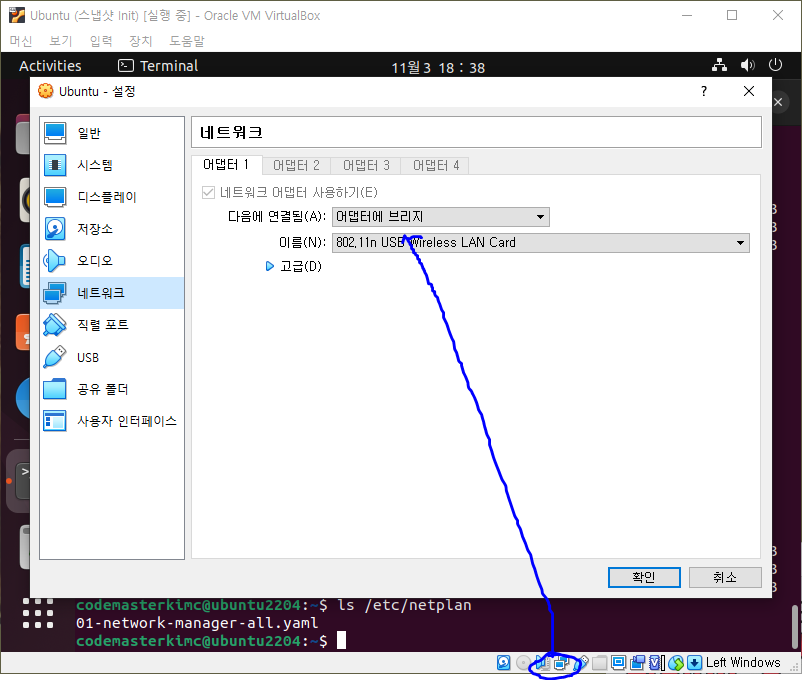
GUI가 지원되는 경우
그 다음에
첫 번째 방법은 GUI 가 제공되는 경우 아래와 같이 setting에 들어가서
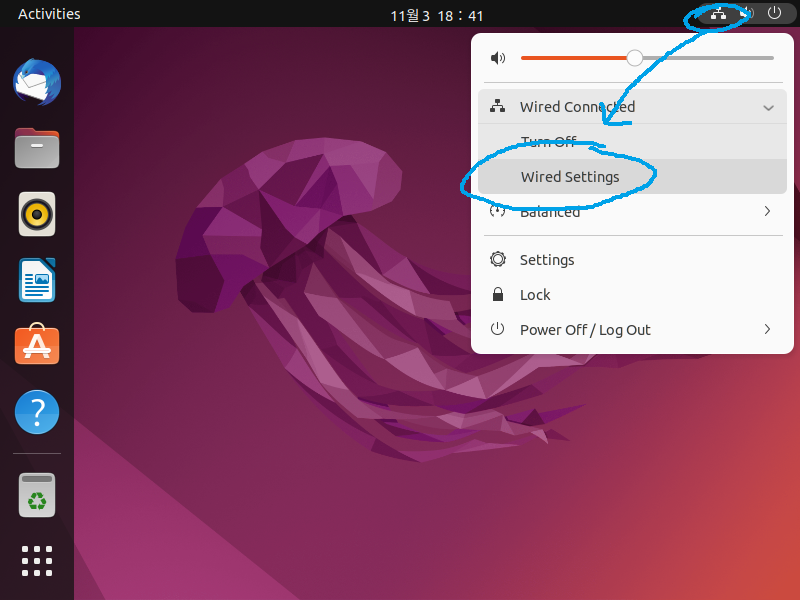
네트워크 값들을 Manual로 해서 입력해주면 됩니다

Console을 사용하는 경우
일단 우분투 기준으로 netplan 파일을 확인합니다.
ls /etc/netplan편의를 위해 관리자 권한을 줍니다
sudo su
아이디도 한번 확인하고
id
vim을 설치합니다
sudo apt install vim
이제 네트워크 매니저를 멈춥니다
systemctl stop NetworkManager
systemctl disable NetworkManager
systemctl status NetworkManager
yml 파일 생성
vim /etc/netplan/kimc01-netconfig.yaml
wifi를 사용한다면 ethernets 대신에 wifi를 사용(현 문서는 랜선을 사용함)
입력 후에 :wq를 눌러서 저장
(필요시 공식 사이트에 나온 것처럼 nameserver도 설정 가능)
network:
  version: 2
  renderer: networkd
  ethernets:
    enp0s3:
      dhcp4: false
      addresses:
        - 192.168.0.20/24
      nameservers:
        addresses:
          - 8.8.8.8
          - 8.8.4.4
      routes:
        - to: default
          via: 192.168.0.1
netplan apply를 통해서 설정 적용
sudo netplan apply
ifconfig로 확인
ifconfig
ping 8.8.8.8 로도 확인
참조
Netplan | Backend-agnostic network configuration in YAML
Below are a collection of example netplan configurations for common scenarios. If you see a scenario missing or have one to contribute, please file a bug against this documentation with the example using the links at the bottom of this page. Thank you! Con
netplan.io