기타/프로그래밍 기타
윈도우에서 Chocolatey 설치하는 한가지 방법
kimc
2022. 4. 20. 22:12

이번 글을 통해 배워갈 내용
- 윈도에서 Chocolatey 설치하는 한 가지 방법
1. 윈도우에서 powershell을 실행합니다
Window + R을 눌러 실행을 열고
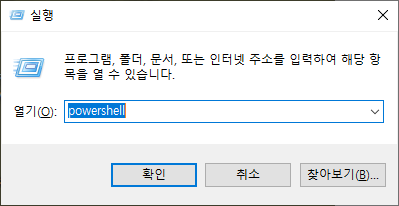
powershell을 친다음
crtl + shift + enter를 입력해서
관리자 권한으로 실행하셔도 되고 직접 찾으셔서 관리자 권한으로 실행하셔도 좋습니다.

2. 아래 명령어를 입력 후 엔터를 누릅니다.
Set-ExecutionPolicy Bypass -Scope Process -Force; [System.Net.ServicePointManager]::SecurityProtocol = [System.Net.ServicePointManager]::SecurityProtocol -bor 3072; iex ((New-Object System.Net.WebClient).DownloadString('https://community.chocolatey.org/install.ps1'))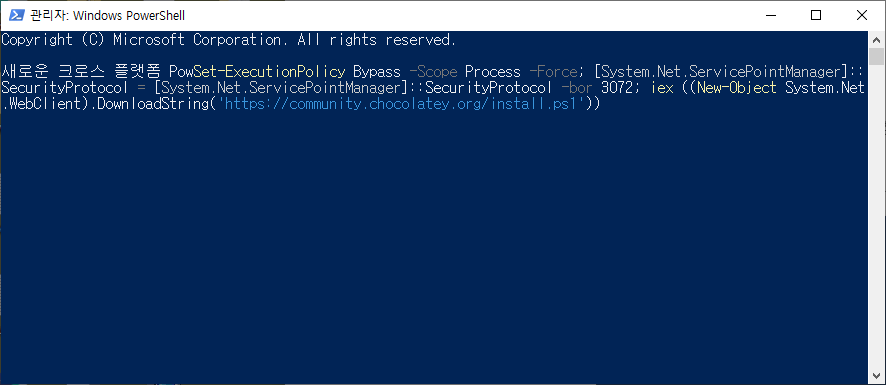
3. 설치가 완료되면 Choco를 입력해서 확인해줍니다

설치가 안될 경우 아래 링크 및 필요한 내용들을 참조해주시면 좋습니다.
- Windows 7+/Windows 2003+ (Server Core also, but not Windows Nano Server)
- Windows PowerShell v2+ (not PowerShell Core aka PowerShell 6 yet)
- . NET Framework 4.x+
https://docs.chocolatey.org/en-us/getting-started
읽어주셔서 감사합니다 좋은 하루 보내세요~
출처 및 인용
https://chocolatey.org/install
Installing Chocolatey
Chocolatey is software management automation for Windows that wraps installers, executables, zips, and scripts into compiled packages. Chocolatey integrates w/SCCM, Puppet, Chef, etc. Chocolatey is trusted by businesses to manage software deployments.
chocolatey.org
728x90