
이번 글을 통해 배워갈 내용
- Azure Functions 설명
- Azure Functions 로컬 설치
- Azure Functions 로컬 Template 실행
1. Azure Functions 설명
Azure Functions는 Microsoft Azure에서 제공하는 클라우드 서비스로서 Serverless Computing을 제공합니다.
이를 통해 사용자는 데이터 베이스에 반응하는 웹 API를 구축하거나 Iot 스트림을 처리하거나나 메시지 대기열을 관리하는 등의 작업을 할 수 있습니다.
간단하게 풀어서 설명하자면
"Run code on Demand"
필요할 때만 코드를 실행하는 기능이라고 생각하시면 됩니다.
실제로 Azure Functions의 요금제 중에는 코드가 실행되는 것을 기준으로 과금이 되는 것도 있는 것으로 알고 있습니다.
Virual Machine -> Azure Web App -> Azure Functions
관점에서 생각해보면
VM은
OS를 설치해서 사용하고
IaaS Infrastructure as a Service 로서
소프트웨어나 설정을 자유롭게 가능하나
OS를 패치해야 되고 직접 스케일링해야 하고
보안을 더 신경 써야 하며
시간 단위로 비용을 지불하는 경우가 많습니다.
Azure Web App은
Platform as a service PaaS 로서
Azure 가 Server를 Patch 하고
AutoScaling 가능
월 단위로 지불을 많이 합니다.
Azure Functions는
Functions as a Service (FaaS)이고
가볍고 빠른 개발이며
월 단위 지불이 아니고
코드가 실행될 때마다 비용을 지불되며
AutoScaling 가능합니다.
2. Azure Functions 로컬 설치
자바스크립트로 진행하겠습니다.
먼저 VScode, npm, node가 설치돼있지 않다면 아래 링크를 참조하셔서 설치해주시면 됩니다.
https://code.visualstudio.com/
Visual Studio Code - Code Editing. Redefined
Visual Studio Code is a code editor redefined and optimized for building and debugging modern web and cloud applications. Visual Studio Code is free and available on your favorite platform - Linux, macOS, and Windows.
code.visualstudio.com
npm
Bring the best of open source to you, your team, and your company Relied upon by more than 11 million developers worldwide, npm is committed to making JavaScript development elegant, productive, and safe. The free npm Registry has become the center of Java
www.npmjs.com
Node.js
Node.js® is a JavaScript runtime built on Chrome's V8 JavaScript engine.
nodejs.org
v4 Window 기준으로 진행하겠습니다.
아래에 있는 명령어를 관리자 권한으로 명령 프롬트에 입력해서 설치해줍니다.
Window npm v4
npm i -g azure-functions-core-tools@4 --unsafe-perm trueWindow chocolatey v4
choco install azure-functions-core-tools
MAC v4
brew tap azure/functions
brew install azure-functions-core-tools@4
Linux Ubuntu 20.04
wget -q https://packages.microsoft.com/config/ubuntu/20.04/packages-microsoft-prod.deb
sudo dpkg -i packages-microsoft-prod.deb
MAC, LINUX 이시라면 아래 링크를 참조해주시면 됩니다.
https://github.com/Azure/azure-functions-core-tools
GitHub - Azure/azure-functions-core-tools: Command line tools for Azure Functions
Command line tools for Azure Functions. Contribute to Azure/azure-functions-core-tools development by creating an account on GitHub.
github.com
설치가 완료되셨다면
윈도, 맥, 리눅스 동일하게 아래 내용을 따라 해 주시면 됩니다.
명령 프롬트에서 func를 입력해서 설치를 확인해줍니다.
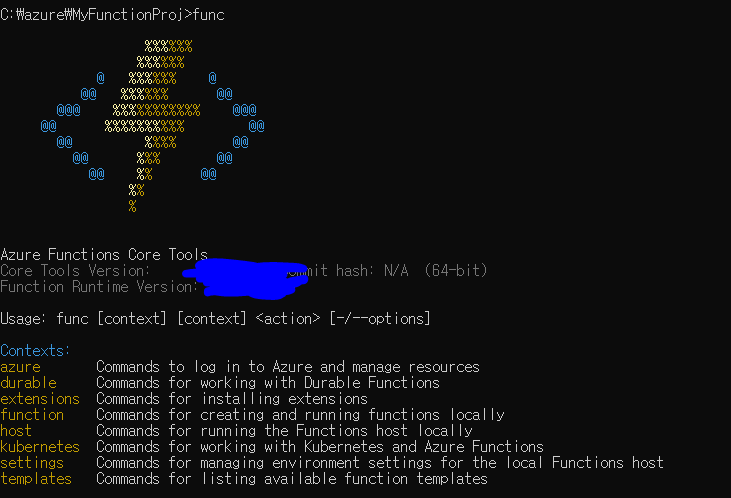
그다음 프로젝트를 설치하고자 하는 디렉터리로 이동해서
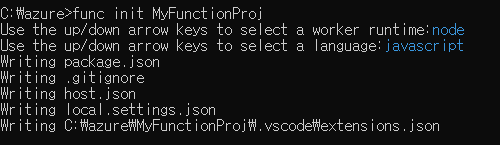
샘플 프로젝트를 만들어봅니다.
func init MyFunctionProj
저는 node에 javascript를 사용하였습니다.
3. Azure Functions 로컬 Template 실행
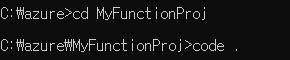
그다음 프로젝트 내부에 샘플 Function을 만들어 줍니다
일단 비주얼 스튜디오로 이동합니다
cd myFunctionProj
code.
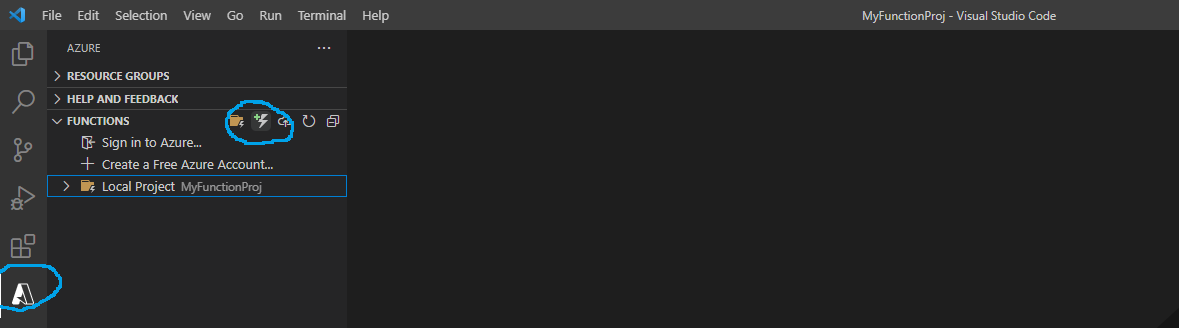
Azure Functions Extension을 설치합니다.
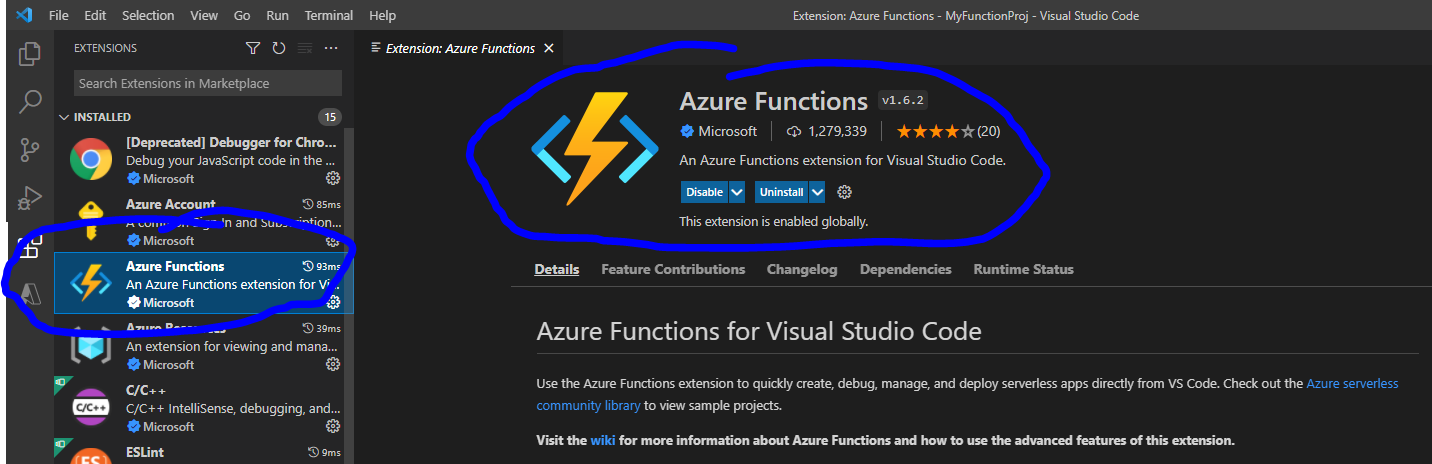
설치 후에 왼쪽 네비 바에 Azure 아이콘 클릭 후 아까 설치한 로컬 프로젝트에 Function을 추가하기 위해서 아래 파란 원안에 있는 번개 표시를 클릭해서 템플릿 Functiond을 추가해줍니다.
Sendgrid, Blobtrigger, Iot Hub, Bus Queue 등 흥미진진한 게 많지만
오늘은 템플릿만 만들기 위해서 HTTP Trigger를 사용해보겠습니다.
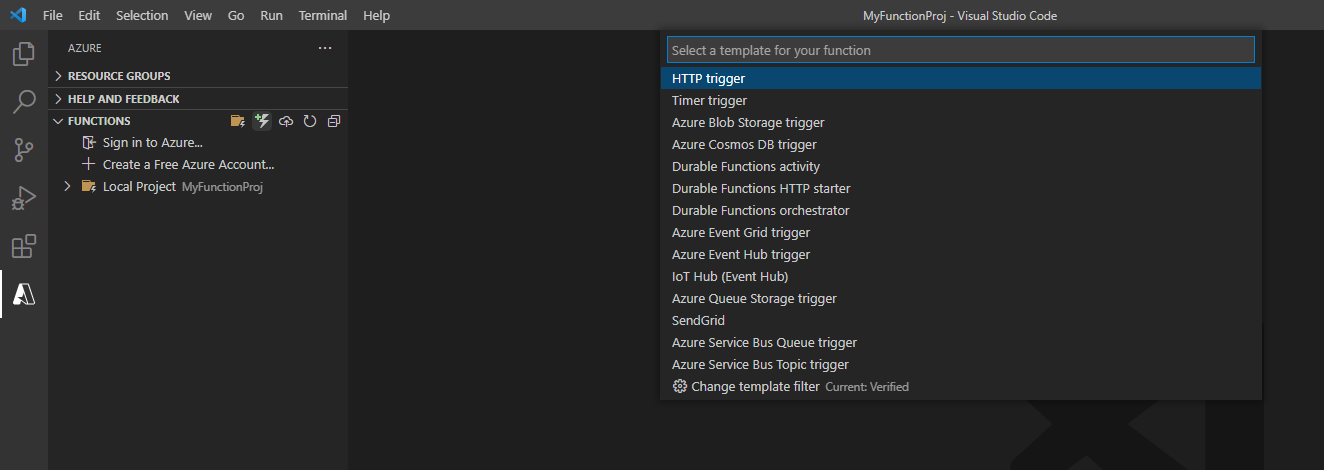
클릭 후 엔터를 누른 다음
로컬 프로젝트를 확인해보시면 아래와 같이 설치된 것을 확인해 볼 수 있습니다.
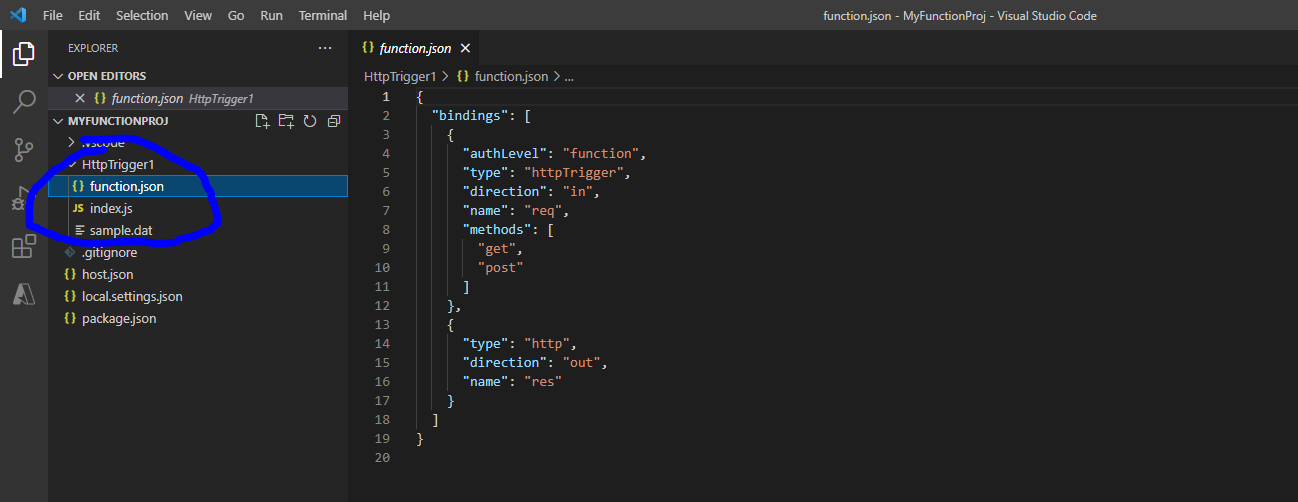

HTTP 트리거가 발생해서
GET 방식으로 파라미터에 name을 넣고 보내면 Hello와 함께 문구가 출력되는 코드라는 것을 확인할 수 있습니다.
자 그럼 다시 관리자 창으로 돌아가서 위의 Function을 로컬에서 실행해보겠습니다.
func start를 입력해서 실행합니다.
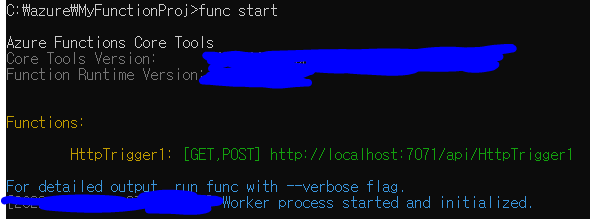
실행을 확인했습니다.
그러면 API 통신을 보내서 Trigger를 해보겠습니다.
http://localhost:7071/api/HttpTrigger1

http://localhost:7071/api/HttpTrigger1?name=codemasterkimc
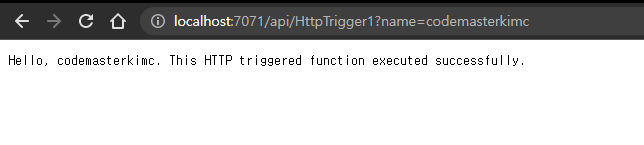
성공적으로 Function이 실행된 것을 확인할 수 있습니다.
마지막으로 3가지 꿀팁을 드리며 마치겠습니다.
1. 짧고 Stateless 한 Functions
2. 에러 핸들링이 잘되는 Defensive 한 Functions
3. 필요시 Concurrency 적용이 잘된 Functions
를 저는 좋은 Functions 라 생각하고 위의 세 가지를 생각하면서 작성하니까 도움이 많이 되었습니다.
읽어주셔서 감사합니다
무엇인가 얻어가셨기를 바라며
오늘도 즐거운 코딩 하시길 바랍니다 ~ :)
참조
https://docs.microsoft.com/en-us/azure/azure-functions/
Azure Functions documentation
Azure Functions is a cloud service available on-demand that provides all the continually updated infrastructure and resources needed to run your applications. You focus on the pieces of code that matter most to you, and Azure Functions handles the rest. Fu
docs.microsoft.com
Triggers and bindings in Azure Functions
Learn to use triggers and bindings to connect your Azure Function to online events and cloud-based services.
docs.microsoft.com
Azure Functions HTTP trigger
Learn how to call an Azure Function via HTTP.
docs.microsoft.com
https://docs.microsoft.com/en-us/azure/azure-functions/functions-best-practices?tabs=csharp
Azure Functions best practices
Learn best practices for designing, deploying, and maintaining efficient function code running in Azure.
docs.microsoft.com
'Javascript > 웹 기타' 카테고리의 다른 글
| html css로 카드 뒤집기 구현해보는 한가지 방법 (0) | 2022.06.18 |
|---|---|
| HTML tag 안에 data attribute 저장하기 (0) | 2022.05.08 |
| Javascript 없이 CSS,SVG로 멋진 Loading bar 효과 구현해보기 (0) | 2022.04.10 |
| Javascript 없이 CSS,SVG로 멋진 Ripple 효과 구현해보기 (0) | 2022.04.10 |
| CSS에서 패딩 속성이 너비 또는 높이를 변하게 하지 못하게 하는 한가지 방법 (0) | 2022.03.13 |